What to check before a quesadilla meme photo
Decide which face changes, how many photos to add, and what the six-second download keeps before you generate.
Before you add a photo, check which face should change, how many portraits you have, and whether you want the original six-second landscape clip with its soundtrack. The generator offers that scene as Singer, Reaction, or Both roles. Those choices decide who appears in the download. The line, the cuts, the length, and the sound stay with the source.
How Singer, Reaction, and Both roles differ
Singer uses one photo for the foreground singer. The face follows her through the outdoor verse, the indoor close-up, and the tortilla reveal. She gestures outside, leans into the indoor close-up, and holds the tortilla up on the last beat. The photo supplies her appearance across both outfits. The original background reaction remains.
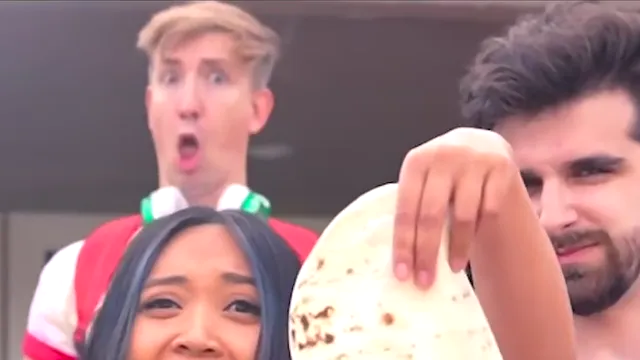
Reaction uses one photo for the performer behind the singer. That role is the blond performer in green headphones in the outdoor group. Your face follows the final jaw-drop, behind the foreground singer, through the last frame. The original singer still delivers the line.
Both roles gives one slot to each part. Photo 1 is the foreground singer. Photo 2 is the performer who drops his jaw behind her. One photo changes one role. Two photos cast both parts. An empty slot keeps the original performer. Start as a guest with one photo, and add a second photo for the other role.
Choose Singer when your photo should deliver the line and hold up the tortilla. Choose Reaction when you want the shocked look and your face can sit behind the singer. Choose Both roles when two people should split those parts, or when you want to replace only one part.
Check the role map, then generate
Open Role map above the workbench and match it to the role row before you upload. In the final outdoor frame, the foreground face sits below the tortilla. The reaction performer is behind and above her on the left.
Play the reference clip so you can see the timing and where the selected role appears. Then pick 480p, 720p, 1080p, or 4K. Every option is about six seconds in the original landscape frame. A higher resolution changes the export size. It does not add people, length, or a different soundtrack.
Generation uses credits. Choose the scene and resolution to see the current charge and whether generation is available. Published prices were recorded when that page was published, so use the figure the generator shows. When credit pack checkout is available, a completed purchase adds that pack's credits to your balance. Download the MP4.
A worked example
Riley has one well-lit portrait and wants to perform the line. Riley selects Singer, checks the role map, and leaves the background reaction untouched. The download is the full clip: outdoor gesture, indoor close-up, tortilla reveal, original soundtrack, about six seconds.
If the joke Riley wants is the jaw-drop, the same portrait goes on Reaction. The original singer still performs the line, and Riley appears behind her at the end.
If Riley and a friend both want in, they use Both roles. Riley is photo 1, the singer. The friend is photo 2, the reaction. Uploading only Riley leaves the reaction slot with the original performer.
When the result looks wrong
If the wrong person changed, the photo is in the other slot. Singer is the foreground face under the tortilla. Reaction is the face behind and above on the left. Reassign the photo on the role row and generate again.
If only one of two people changed, the other slot was empty. Both roles keeps the original performer in any slot you leave blank.
If the face looks muddy on the indoor close-up, use a portrait with the full face visible and enough light to see the features. A normal expression is fine. The photo supplies appearance, and the source performance supplies the gesture, the tortilla, and the jaw-drop. Give each slot its own portrait.
Limits
The download stays the original scene: about six seconds, two hard cuts, the tortilla reveal, and the original soundtrack in a landscape frame. Both roles accepts up to two photos. Reaction stays behind the singer. Singer keeps the original background reaction. The generator shows the current credit charge, which can differ from the figure recorded on the pricing page.
What should I check before I put a photo in the More Like a Quesadilla meme?
Check which face should change, how many portraits you have, and that you want the original soundtrack in a landscape clip of about six seconds. Singer replaces the foreground singer with one photo and leaves the background reaction. Reaction replaces the performer behind her and leaves the original singer. Both roles can replace either part or both. An empty slot keeps the original person. Pick 480p, 720p, 1080p, or 4K only after the cast is set, then read the current credit charge in the generator.
Which scene should I use for one photo?
Choose Singer if the photo should be the person who delivers the line, from the outdoor verse through the indoor close-up to the tortilla. The original background reaction remains. Choose Reaction if the photo should be the blond performer in green headphones who drops his jaw behind her. The original singer still delivers the line. Both roles is the single-photo option only when you want one of those two slots changed and the other left as the original performer.
How do I put two people in the clip?
Select Both roles and add two portraits. Photo 1 is the foreground singer. Photo 2 is the reaction performer behind her. You can start as a guest with one photo, then add the second photo to replace the other role. A single photo on Both roles changes only the slot you fill.
Will the download include the original sound?
Yes. The finished MP4 uses the original source clip and carries its soundtrack with the performance. The clip runs about six seconds in a landscape frame, including two hard cuts and the final reaction. Singer, Reaction, and Both roles all keep that length and sound.
Why did the wrong person change?
The portrait is on the other role. In the final outdoor frame, the singer is the foreground face below the tortilla, and the reaction performer is behind and above her on the left. Open Role map above the workbench, match it to the role row, move the photo, and generate again. If someone you expected is still the original performer, that slot was empty.