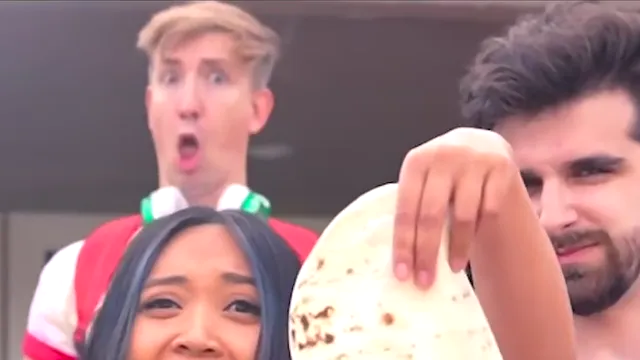
How many photos you need for each scene
One photo is enough. Add a second only on Both roles, when you also want to replace the other person.
One photo is enough. Singer takes one portrait. Reaction takes one portrait. Both roles has two slots, and you add a second photo only when you want the other person replaced too. An empty slot keeps the original performer.
Match the count to the job:
You want the line and the tortilla, and the original jaw-drop can stay. Choose Singer and upload one photo. That photo covers the outdoor verse, the indoor close-up, and the tortilla, across both outfits.
You want the shocked person behind the singer. Choose Reaction and upload one photo. The original singer delivers the line.
Two people both want to appear. Choose Both roles. Photo 1 is the foreground singer. Photo 2 is the performer who drops his jaw. This is the case that uses two photos.
You are on Both roles and only one person should change. Fill that slot and leave the other empty. The empty slot stays with the original performer.
Example. Priya wants the tortilla and the line. Her brother wants to stay out of the clip. Priya chooses Singer and uploads one well-lit, full-face portrait, then stops. Later they both want in. Priya switches to Both roles, keeps her portrait as photo 1, and adds her brother's portrait as photo 2. Leaving photo 2 empty would have kept the original reaction performer.
What you trade. One photo keeps the other performance familiar, which helps the meme stay recognizable. Two photos let you cast the line and the reaction with the people you chose. Singer and Reaction each have a single role, so a second file belongs on Both roles, not as a duplicate face in the same slot.
If both original people are still in the result, no portrait was assigned. If the wrong friend is holding the tortilla, that file is in photo 1. Swap the uploads. If you had one portrait and opened Both roles, fill the slot you care about and leave the other empty. You can start as a guest with one photo, then add another photo when you want to replace another role.
Limits. The faces you can change are the singer and the reaction performer. The singer gestures toward a bearded performer outside, and that person is not an extra upload slot. A second photo does not change the six-second landscape timing or remove the original soundtrack. Generating uses credits for the scene and resolution you select. The generator shows the current charge, which can differ from an older published list.
How many photos do I need for a More Like a Quesadilla video?
One photo is enough. Singer uses one portrait and Reaction uses one portrait. Both roles has two slots: add a second photo only when you want to replace the other person too. An empty slot keeps the original performer in that role.
What happens if I leave one Both roles slot empty?
The empty slot stays with the original performer. Photo 1 is the foreground singer and photo 2 is the jaw-drop behind her. Fill only photo 1 to change the singer, or only photo 2 to change the reaction. You do not have to supply both portraits.
Which one-photo scene puts me on the singer?
Choose Singer. One portrait plays the foreground across the outdoor verse, the indoor close-up, and the tortilla reveal. The original background reaction remains. Choose Reaction instead when that one portrait should be the jaw-drop and the original singer should keep the line.
Can two friends appear in the same clip?
Yes. Use Both roles and two portraits. Put the friend who should sing and hold the tortilla in photo 1. Put the friend who should drop his jaw in photo 2. One photo cannot cover both of those roles, and Singer or Reaction each replace only one person.