What those six landscape seconds include
About six seconds, landscape, with both hard cuts, the tortilla reveal, and the final jaw-drop included.
The finished video runs about six seconds in a landscape frame. Inside that time, the editor follows the full reference: two hard cuts and the final reaction, from the opening gesture to the tortilla.
Walk the seconds so you know what a post will contain:
Outdoor opening. The singer gestures toward the bearded performer outside. The reaction performer, blond and wearing green headphones, watches from behind the singer.
First hard cut. The shot becomes an indoor close-up and the singer leans into the lens. On Singer, one photo supplies the singer's appearance across the outdoor outfit and this indoor outfit.
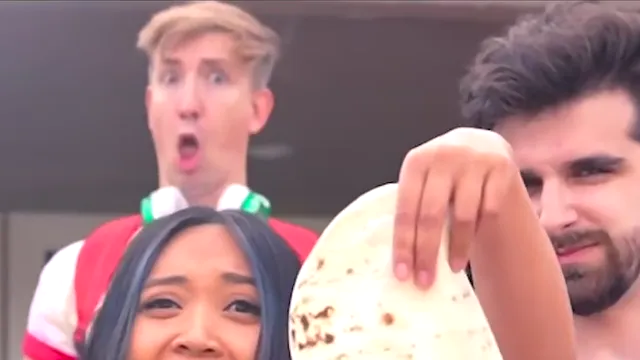
Second hard cut. The shot returns outdoors. The singer brings the tortilla forward. The reaction performer drops his jaw and holds that look through the last frame. On Reaction, your face follows that jaw-drop while the original singer delivers the line.
Play the reference before you generate and name the three shots. If the planned post can hold all three, pick Singer, Reaction, or Both roles and download the MP4. Play the full result and stop only after the tortilla and the jaw-drop.
Example. Avery's post is supposed to land on the shocked face. That face arrives after the second cut, at the end of the six seconds. Generating the clip and posting the whole MP4 includes the setup and the payoff. The opening gesture alone would show a gesture without the tortilla. The scene options ask for a role and a resolution, not an in-point or an out-point.
What you trade. You get a complete beat, including the indoor close-up between the two outdoor shots. You spend the full six seconds even if you mainly care about the last frame. Singer, Reaction, and Both roles share this timeline. The choice is who appears, then you keep the whole performance. The finished MP4 also carries the original soundtrack.
If the file seems to end on the indoor face, play it to the last frame in a local player. The final frame should show the outdoor tortilla and the open-mouthed reaction behind the singer. If a website preview stops early, the preview is shorter than the full result the studio tells you to play and save.
Limits. Count on about six seconds, a landscape frame, both hard cuts, and the final reaction. The pages do not describe a trim, a freeze on the tortilla, or a vertical reframe. Resolutions are 480p, 720p, 1080p, and 4K for this same clip. The generator shows the current credit charge before you generate.
How long is the finished More Like a Quesadilla video, and is it landscape or vertical?
The finished video runs about six seconds in a landscape frame. It includes the two hard cuts and the final reaction, from the opening gesture to the tortilla. The frame follows the original landscape source. Plan on a wide picture of that full reference, not a tall reframe.
Which shots are inside those six seconds?
Three shots, joined by two hard cuts. The singer starts outdoors and gestures toward the bearded performer. The first cut is an indoor close-up where the singer leans into the lens. The second cut returns outdoors for the tortilla and the jaw-drop behind the singer through the last frame.
Can I export only the tortilla reveal?
The editor follows the full reference, including both hard cuts and the final reaction. The scene choices are Singer, Reaction, and Both roles, plus a resolution. They do not ask for a start time or an end time. Generate the whole six-second landscape clip and post the full MP4 if you need the reveal.
How do I check the framing before I spend credits?
Play the reference from the opening gesture to the final reaction. Confirm you can see a wide frame, the indoor cut, the tortilla, and the reaction performer behind and above the singer on the left. Then pick the scene and resolution. The generator shows the current charge and whether generation is available.