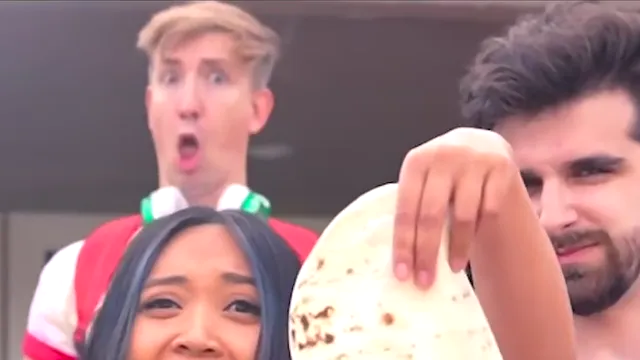
What the original tortilla reveal reference clip shows
The reference clip is the original landscape performance, from the opening gesture through the final jaw-drop. Watch it before you choose a role.
The original tortilla reveal reference clip shows the landscape source performance from the opening gesture through the final reaction. It is the scene the editor follows, not a finished cast of your photo.
That source runs about six seconds. The singer gestures toward the bearded performer outside, leans into the lens on the indoor cut, and brings a tortilla toward the camera on the last beat. Behind her, the blond performer in green headphones drops his jaw and holds a wide-eyed, open-mouthed look through the last frame. The clip has two hard cuts. A finished MP4 of this scene carries that original soundtrack.
The meme comes from the 2021 Come Back Daniel music video by the Spy Ninjas. On the scenes page, the reference labeled the original tortilla reveal is the landscape source, not the full song and not your upload.
How to use the reference before you upload
Play the reference from the opening gesture to the final reaction. Note where the singer is and where the reaction sits.
In the final outdoor frame, the singer's face is below the tortilla. The reaction performer is behind and above her on the left.
Choose a scene from what you want to replace. Singer takes the foreground across all three shots and leaves the background reaction unchanged. Reaction takes the jaw-drop behind her. Both roles can take either part, or both.
Add a photo only after the timing makes sense. One well-lit portrait with the full face visible is enough for one role. A normal expression is fine.
Worked example
Riley plays the reference once. The outdoor gesture, the indoor close-up, and the tortilla moving toward the lens are all the same foreground singer. The shocked face appears behind her at the end. Riley wants that shocked face, so Riley chooses Reaction and leaves the singer as the original performer.
What the reference is not
It does not show your photo, and it is not one of the sample casts. Sample videos are different people already placed in the scene. The reference is the original performance those edits follow.
Watching it does not create a video. Generation uses credits, and the generator shows the current charge for the scene and resolution you pick. The downloadable result is a new edit of about six seconds in the same landscape frame, with the original sound and with your photo only in the roles you filled. Empty roles stay with the original people.
What does the original tortilla reveal reference clip show?
It shows the original landscape source, from the opening gesture through the final reaction. The singer brings a tortilla toward the lens, and the person behind her makes a wide-eyed, open-mouthed reaction. The clip is about six seconds and includes two hard cuts.
Is the reference the same thing as a sample video?
No. The reference is the original performance, labeled the original tortilla reveal. Sample videos are different casts and takes on that scene. Watch the reference for timing and positions, and watch samples to compare other people in the roles.
Who is on screen in the reference, and who can I replace?
The foreground singer gestures outside, leans in on the indoor cut, and holds up the tortilla. The blond performer in green headphones watches from behind and drops his jaw at the end. The singer also gestures toward a bearded performer outside. Only the singer and the reaction performer are roles you can replace.
Does watching the reference use credits or replace anyone?
No. Playing the reference only shows the source. A video is generated after you choose Singer, Reaction, or Both roles and add a photo. Generation uses credits, and the generator shows the current charge for the resolution you select. Empty roles keep the original people.