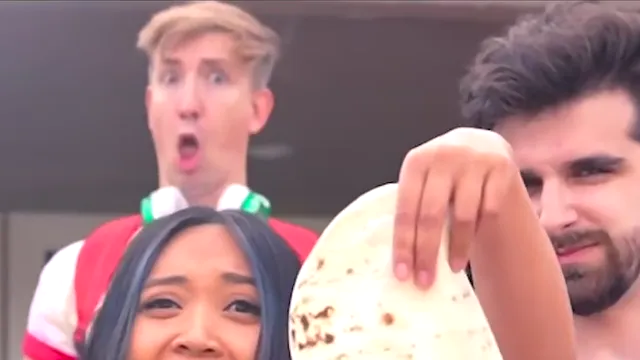
What the More Like a Quesadilla sample videos show
Sample videos show different casts and takes on the six-second scene. Use them to compare the singer and the reaction before you add a photo.
The More Like a Quesadilla sample videos show different casts and takes on this scene. They are other people placed in the same six-second clip, so you can compare those versions before you choose a role and upload a photo.
A cast is someone else in the landscape scene. A take is another pass on that same scene: the outdoor verse, the indoor close-up, and the final tortilla reveal. Samples are for comparison. They are not the original reference clip, and they are not a preview of your face. A finished video from this scene carries the original soundtrack.
How to read a sample and choose a scene
Watch a few samples and look only at which faces changed.
Use the final outdoor frame as a map. The foreground face under the tortilla is the singer. The face behind and above her on the left is the reaction performer.
If you want the line and the tortilla, use the Singer scene and one photo. The original background reaction remains.
If you want the shocked look, use the Reaction scene and one photo. Your face follows the final jaw-drop while the original singer delivers the line.
If you want both people replaced, use Both roles. The first photo is the singer. The second photo is the reaction. You can also fill only one slot. The empty slot keeps the original person.
Worked example
Casey has two portraits and wants a friend to hold the tortilla while Casey does the jaw-drop. Those are separate performances in the same six-second clip. Casey opens Both roles, puts the friend's photo in the singer slot, and puts Casey's photo in the reaction slot. One portrait would be enough only if Casey were changing a single role.
Limits
Samples do not generate your video. You still add at least one photo, pick Singer, Reaction, or Both roles, and choose a resolution. The generator shows the current credit charge before it runs. You can start as a guest with one photo, and add another only when you want a second role replaced.
A sample will not match your photo. Use one well-lit portrait per role, with the full face visible and a normal expression. Every take stays about six seconds, in a landscape frame, with two hard cuts and the final reaction. If you wanted the untouched original performers, play the reference clip labeled the original tortilla reveal instead of a sample.
What do the More Like a Quesadilla sample videos show?
They show different casts and takes on the scene. Use them to compare other people in the six-second clip before you decide whether your photo should play the singer, the reaction, or both.
How are sample videos different from the reference clip?
The reference clip is the original landscape source from the opening gesture to the final reaction. Samples are other casts of that scene, not the untouched original performers. Play the reference for source timing. Watch the samples to compare other people in the roles.
Can I use a sample instead of uploading a photo?
No. Samples are examples to watch. Your clip still starts from a photo you add. One photo covers Singer or Reaction. Both roles accepts up to two photos, and an empty slot keeps the original performer. Generation uses credits.
What should I compare while a sample plays?
Check which face changed. In the final outdoor frame the singer sits below the tortilla, and the reaction performer is behind and above her on the left. That shows whether you want Singer, Reaction, or Both roles for your own photo.